Omni Knows Neo: A Research Agent Whose Answers You Can Verify
The biggest problem with AI assistants isn't that they can't answer. It's that they answer with total confidence and leave you no way to tell whether they're right.
Omni Knows Neo (Omni for short) is an AI research assistant built around one idea: verifiability. It searches the web, reads pages, runs code, and writes reports on its own, and at any moment you can go back to the original source and check whether a sentence is actually backed by evidence.
Try it at omniknows.xyz. The backend is open source: omni-neo.
Four Things Omni Is Built For
1. Every claim has a source, and you can check it
Any fact in an answer that came from search, a web page, weather, stocks or exchange rates carries an [n] citation that opens the original source.
We went two steps further:
- Sources carry a credibility label. Every search result is graded: official, trusted, first-party, social media, arguable, or junk. Junk is dropped before the model ever sees it. Arguable sources are passed along with a reason, so the answer can attribute and hedge instead of repeating them as settled fact.
- Highlight a sentence to verify it. Select any sentence in an answer and Omni searches every source retrieved in the conversation for the passage that actually supports it, then highlights that passage in the source page. If the model made something up, you see it right away.
2. From one question to a full research report
For a complex question, Omni doesn't hand you a wall of text. It first confirms the scope with you, then works through plan → gather → reflect → write, and streams the finished report into the Canvas reader on the right while you read.
- Reports embed interactive charts built from real tool output, not mental math.
- Questions about places (restaurants, sights, hotels) render a map right in the answer.
- Built-in workflows cover deep research, trip planning (itinerary, weather, maps, a day-by-day report), guided learning (explanations, charts, quizzes, study notes) and email drafting.
- A report can be published as a public link (Omni Pages) with one click.
3. Rix: our own SFT model
The model selector has one special entry: Rix.
Rix is an in-house model we built by running SFT on an open-weight base with real Omni agent trajectories. It is tuned for Omni's tool calling, skill loading and answer style, so it is fast, cheap, and accepts image input.
How Rix was trained deserves its own post, which is Introducing Rix.
4. It remembers you, and works while you're away
- Global memory. When enabled, Omni distills your long-term preferences across conversations into a memory document that belongs to you. You can view or clear it at any time.
- File uploads. Images, PDF, Word, Excel, PowerPoint, Markdown and source code files. Omni reads through them itself to answer your questions.
- Scheduled research. Say "send me an AI industry briefing every Monday morning" and Omni shows a confirmation card. Once you confirm, it researches on schedule, emails you the report, and leaves behind a conversation you can keep asking questions in.
- Live voice. Talk to Omni like a phone call, and interrupt it whenever you want.
Smaller Details
- Works without signing in. Signing in raises your limits, and a guest's history is merged into the account when you do.
- Any turn can be edited and re-sent, or regenerated, and everything after it rolls back.
- You can switch models in the middle of a conversation.
- After each answer, Omni suggests follow-up questions, and the input box autocompletes.
- When you share a conversation, your memory and location are always stripped out.
Under the Hood
Everything below is technical. If you only care about the product, you can stop here.
Architecture
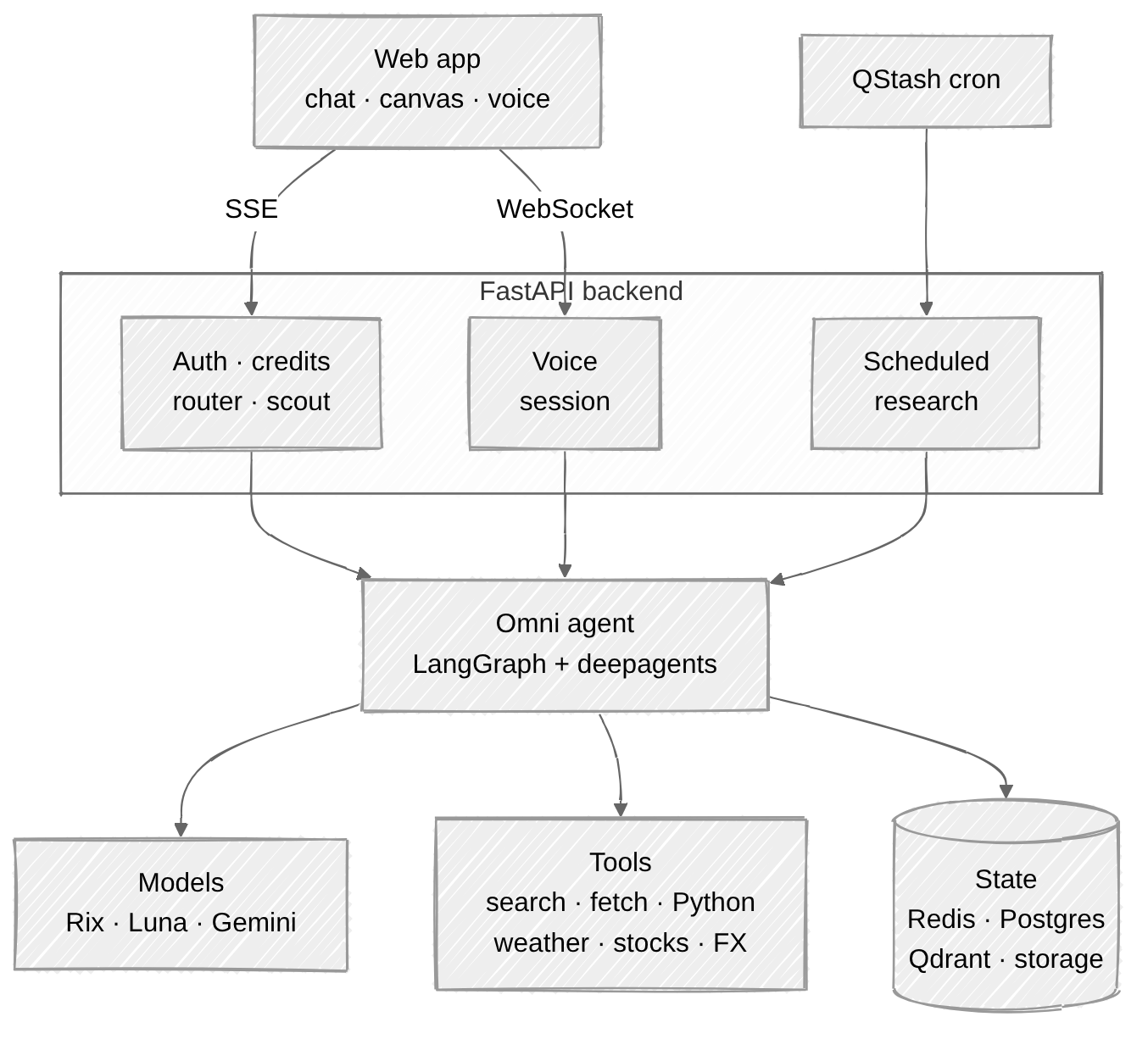
The frontend is Next.js on Vercel. The backend is Python and FastAPI, containerized and deployed on GCP. The agent itself is built on LangGraph and deepagents.
State lives in four places, each with its own job:
- Redis: LangGraph checkpoints, the buffer for streaming events, and the search cache.
- Postgres: threads, memory, usage, file metadata and shared snapshots.
- Qdrant: a vector index of every source an answer has cited, which powers highlight-to-verify.
- Object storage: user uploads.
The life of a turn
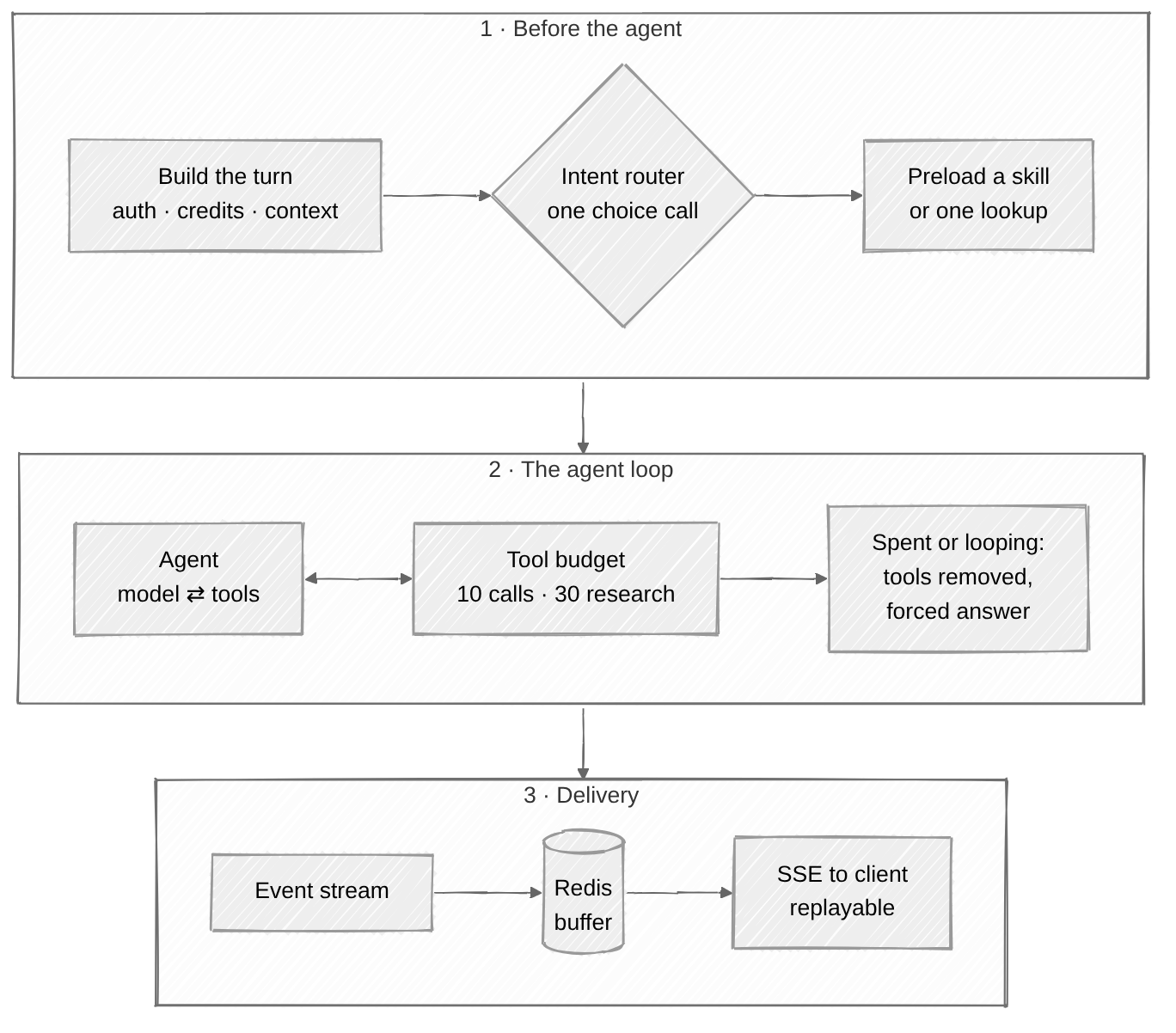
1. Keep data and instructions apart. Before reaching the model, each user message is assembled into tagged blocks: user memory, a system reminder (language, location, local time), attached files, pre-fetched context, and finally the user's actual question. The system prompt states that only the last block is the user speaking. Everything else is background supplied by the app, never instructions.
2. Intent routing. Before the agent starts, we ask OpenAI's Decisions API a multiple-choice question: is this weather, stocks, currency, web search, a question about Omni, a direct answer, or a request for a particular skill? It returns a probability for every option. The bar for choosing a skill is deliberately high (at least 0.8): a false positive sends the agent off on a full research run for a one-shot question, while a miss costs nothing, because the agent can still load the skill itself. If the request fails, a small model classifies the turn instead.
3. The scout. On a conversation's first turn, if the router decides one cheap lookup would give the agent a head start, the scout runs exactly one retrieval (search, weather, a stock quote or an exchange rate) and puts the result, with real citation numbers, into the context. It is a single call with no loop, a hard timeout, and every failure degrades to "no pre-fetch" rather than an error.
4. The agent loop and its tool budget. A turn gets at most 10 tool calls, raised to 30 once a research skill is loaded. If the last three calls were the same tool with identical arguments, or the budget is spent, we don't reply "limit exceeded" and let the model keep banging its head against the wall. We take every tool away, so answering is the only move left. In practice a model told that it has run out of calls tends to keep retrying, and removing the tools works much better.
5. Streaming that can be replayed. The answer is generated in a background task. Every event (reasoning, tool calls, sources, text, charts) is written to a Redis Stream, and the client replays it from the start before tailing live. Refreshing the page, locking your phone or dropping the network won't lose or interrupt an answer in progress. Follow-up suggestions are generated after the answer is done, so they never delay it.
6. A checkpoint every turn. Each finished turn is saved, which is what makes editing history and regenerating possible.
The agent harness: one prompt, many models
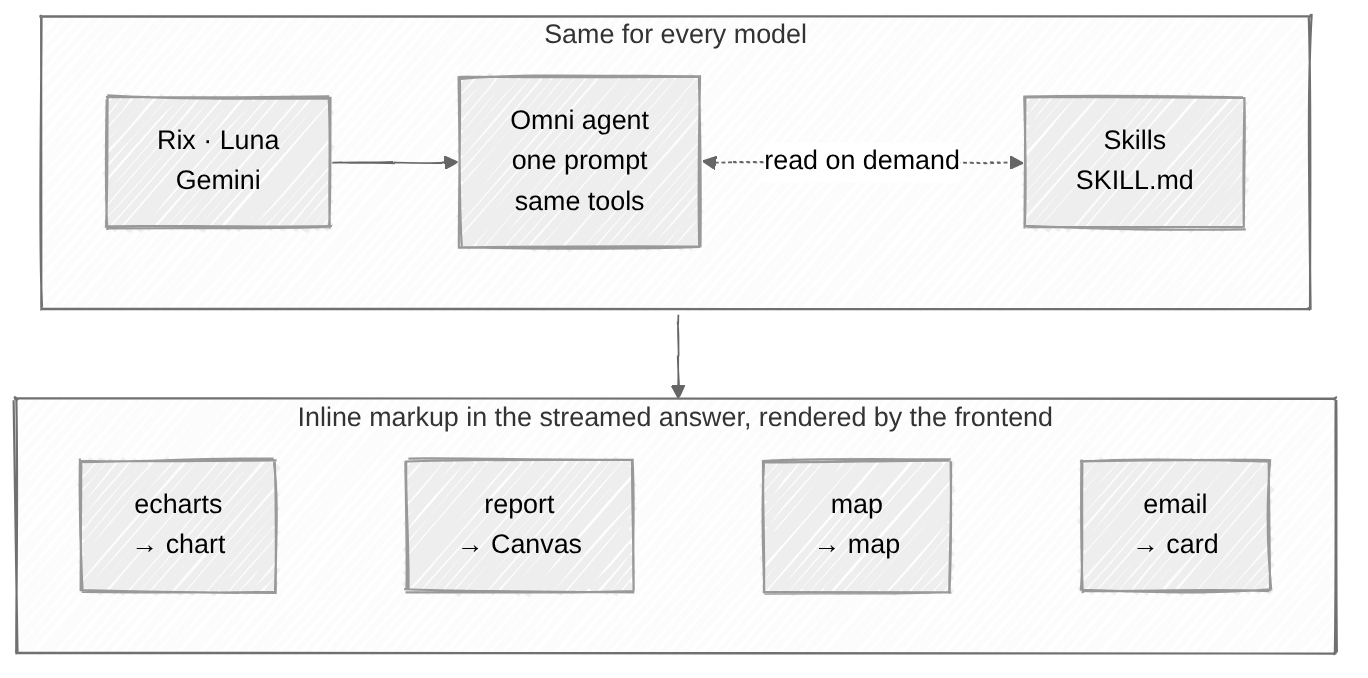
What you pick is a model, not a mode. Whichever you choose, the system prompt, the tools, the skill roster and the tool budget are identical. That isn't just tidiness: our in-house Rix was trained inside this exact environment and has only ever seen this one input, so we fingerprint the whole harness and fail loudly if the prompt, a tool schema or a skill description drifts.
Few tools, stable contracts. The agent has a small toolbox: web search, page fetch, weather (current and forecast), stocks, currency, a Python sandbox (E2B), plus deepagents' own filesystem and todo list. Each capability is an adapter with a fixed name and schema, and the provider behind it can be swapped with one environment variable, with no change to the agent, the prompts or the evals. Each tool's usage rules live in its own docstring, so they travel with the schema.
Skills with progressive disclosure. The system prompt only lists each skill's name and a one-line description. The model reads the full SKILL.md only when it needs it. There are eleven today: deep research, trip planning, guided learning, charting, mapping, report writing, email drafting, scheduled research, asking the user a question, and two identity notes about Omni and its author. The agent doesn't carry a pile of instructions on every turn, yet complex tasks still follow a proven workflow.
Artifacts are markup in the answer, not tools. Charts, reports, maps, email drafts and scheduled-task proposals aren't produced by tool calls. The model writes them directly into the answer as fenced blocks or tags:
- a code block tagged
echartsrenders as an interactive chart; - a document wrapped in
<report>streams live into the Canvas reader; - a code block tagged
maprenders as a map; - emails and scheduled-task proposals render as cards you can confirm or decline.
There is one less round trip, rendering streams naturally, and the same text is both what you see and what gets stored.
Retrieval you can trust
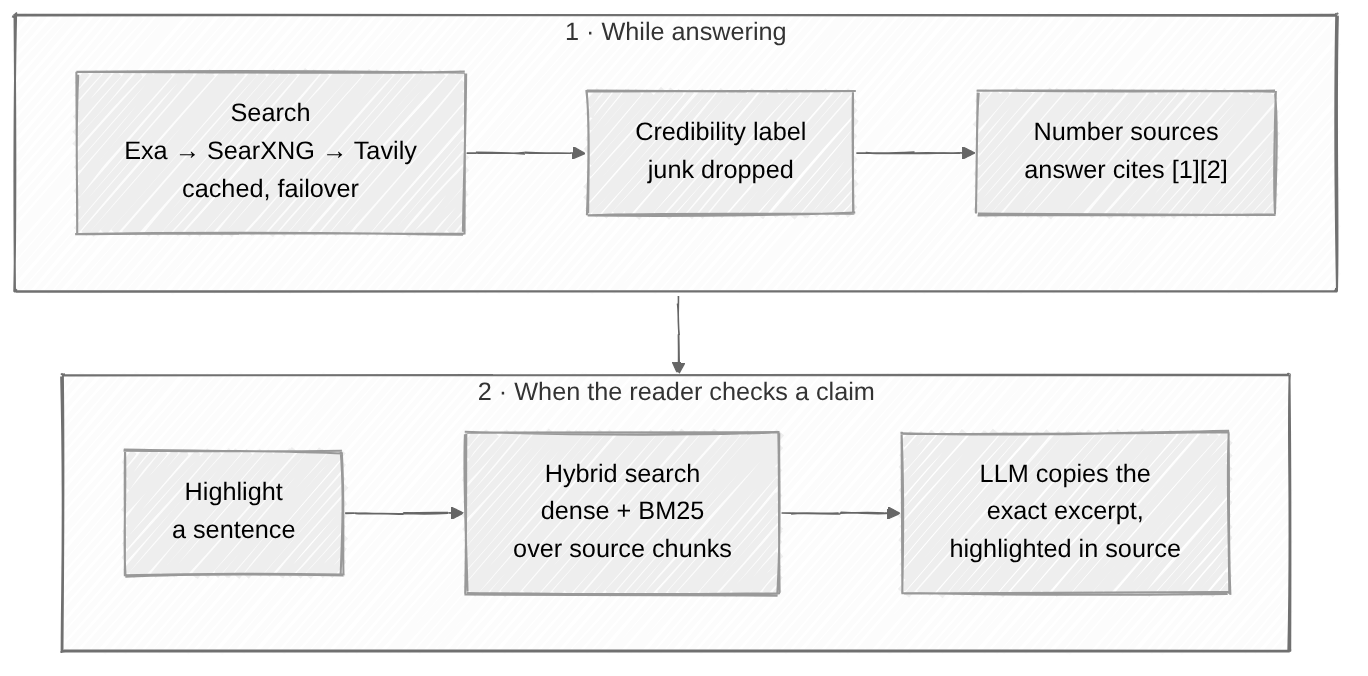
Multiple search backends with failover. Search tries Exa (the default), a self-hosted SearXNG and Tavily, which fail for independent reasons. Only a failure advances to the next backend, never a genuinely empty result, otherwise a question with no answer would hit three paid APIs for nothing. Cache lifetime follows the time range ("past day" is cached for half an hour), and empty or unavailable results are never cached.
Layered credibility, cheapest first. Our own domains are hard-coded as trusted. Government, military and education domains are matched by regex and labeled official. Known domains are looked up in a Redis allowlist. Whatever is left goes to a small model in one batch, which produces both a label and a one-sentence reason. Only domain-level verdicts such as trusted and arguable are cached. Junk is never cached: one junk page doesn't make the whole site junk.
Citation numbers are assigned by the system, not invented by the model. Every search result comes back with its real number. The prompt says to cite only numbers a tool has given, and to stack a paragraph's citations at its end. The stream layer also repairs malformed citations.
Highlight-to-verify (check_source). When a source is retrieved, a background thread splits it into chunks, embeds them and writes them into Qdrant, never blocking the token stream. When you select a sentence:
- We run hybrid retrieval, dense vectors (multilingual MiniLM) plus sparse BM25, and merge the rankings with reciprocal rank fusion;
- A relevance gate on dense similarity, calibrated on real data, decides which chunks are candidates. We would rather let in a false candidate than miss the true source;
- A small model copies verbatim the supporting excerpt out of each candidate. It may copy, never paraphrase;
- The frontend matches that excerpt against the source page and highlights it precisely.
Search is also capped by turn, so a sentence from an early turn can never resolve to a source that only appeared later.
Memory, files and safety
Memory is a Markdown document, not a vector store. After each turn, a small model acts as a memory curator. It reads the old memory and the latest exchange, and rewrites the document only when something durable appears: merging duplicates, retiring stale entries, staying under a size cap, and never storing secrets. It is injected on the first turn of a new conversation, and later turns reuse the copy already in the history.
Files aren't pasted into the prompt. The browser uploads straight to object storage through a presigned URL, and the backend converts PDF, Office, ePub and similar formats into Markdown and mounts them in the agent's virtual filesystem. The agent explores them like a developer browsing a repo, with ls, read_file and grep, reading only the parts it needs.
Safety. The system prompts are fingerprinted as n-grams, and any verbatim reproduction in the output stream is blocked. We deliberately avoid keyword heuristics: words like "system prompt" and "reasoning" are far too common in ordinary answers, and the false-positive rate made them unusable. Harmful requests are scored by Llama Prompt Guard 2, and a tripped conversation is locked. When a conversation is shared, memory and location are always removed.
Models, and Rix
You can pick Best (the default), Rix, GPT-6 Luna or Gemini 3.6 Flash. A thread isn't pinned to a model, so you can switch mid-conversation. If the chosen model errors, the agent falls back to another one.
Rix is SFT'd on top of the open-weight MoE model Gemma 4 26B-A4B (only about 4B parameters active per token). The training data comes from real Omni agent trajectories: answers users gave a thumbs-up, and answers we edited by hand in an internal collector. Trajectories include every tool call and every skill load, so Rix learns the behavior of the whole agent, not just a speaking style. The full training story is in Introducing Rix.
Live voice
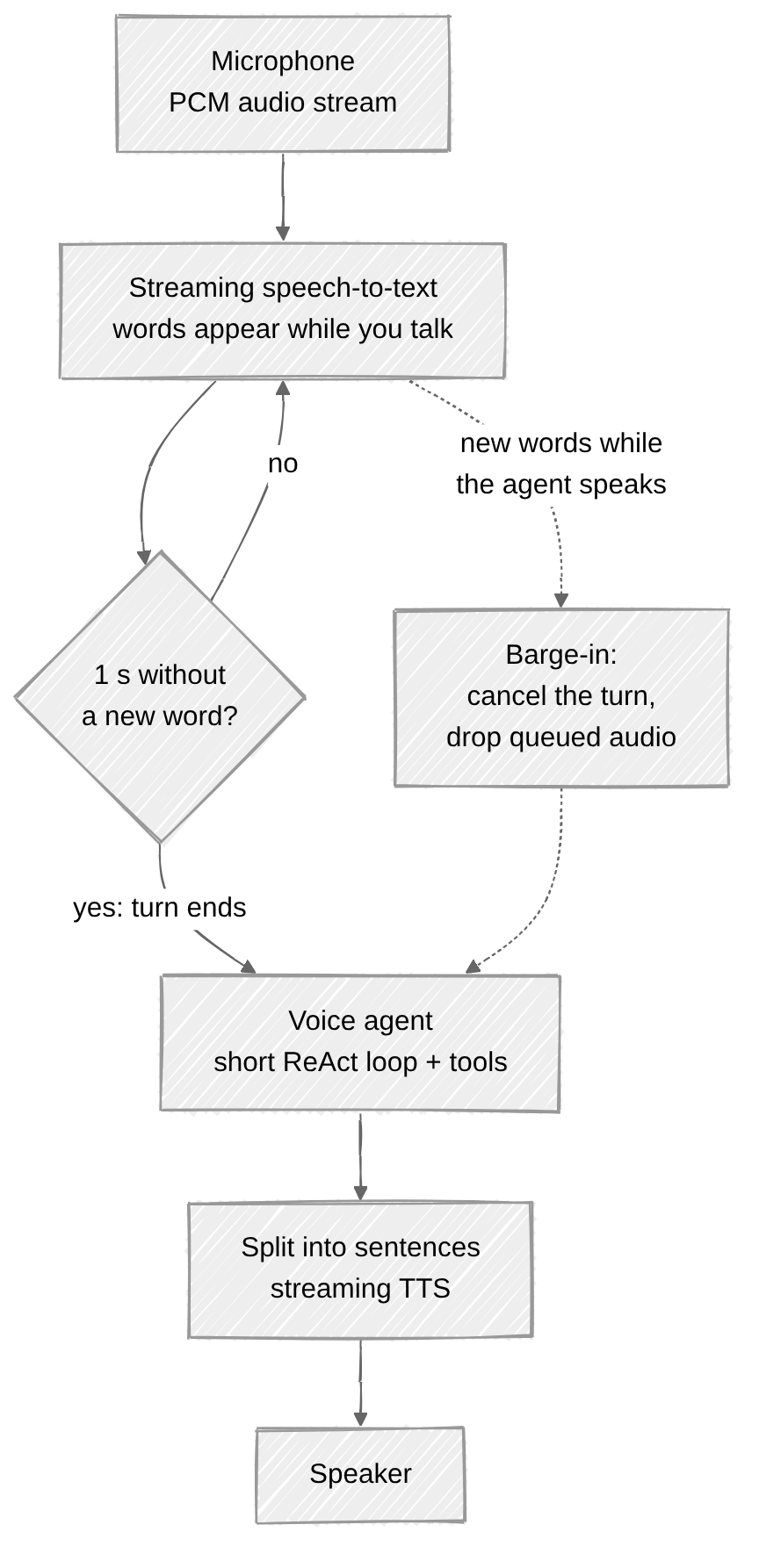
A voice call runs over a WebSocket, with the client continuously streaming microphone audio.
- One signal decides both "what was said" and "are they done". Streaming speech-to-text emits words while you're still talking. Instead of a second, separately tuned audio VAD, we read the transcript itself: if no new word arrives for one second, the turn is over. Two independently tuned detectors can disagree with each other, and one signal can't.
- The voice agent is deliberately light. It has a short ReAct loop and a handful of tools, with no skills and no reports, because in a spoken conversation every extra round trip is silence the user has to sit through. Its model is Rix Voice, a separate SFT we trained for calls, and its replies are kept short.
- Speak while generating. The reply is cut into sentences and fed to streaming TTS, so the first sentence starts playing as soon as it is ready.
- Barge-in. If new words are recognized while the agent is speaking, that counts as an interruption: the current turn is cancelled, every audio chunk is tagged with a turn id, and the client drops anything still in flight. The client schedules playback ahead of time, so we estimate how long the agent is still audible from the PCM we actually sent. Otherwise an interruption near the end of a sentence would be missed.
Scheduled research
A natural-language schedule ("every Monday morning") is first parsed by a small model into a structured plan, then handed to QStash, which calls the backend back on a cron schedule. The unattended agent differs from the interactive one: the full research process is written into its prompt, it must search before answering, and its output is a structured object (title, summary, report) rather than tags scraped from free text with a regex. The result arrives by email and is also saved as an ordinary conversation you can keep chatting in.
How we evaluate the agent
Evals don't go through the HTTP API. They build the same agent in-process, so we get the full message trace, every tool call and every tool result, not just the final text. Scoring has two layers:
- Deterministic checks: did it read the right skill, does the chart JSON parse, did it use the mandated palette, are the numbers in the answer ones a tool really returned. Anything code can decide never goes to a model.
- LLM judge: scores content quality and workflow adherence. The judge must quote the passage it is scoring before giving a score, which cuts down on confidently wrong grades.
Model fallback is switched off during evals. Otherwise a dead provider silently falls back to another model, you think you're measuring A while you're measuring B, and the whole batch is worthless without anyone noticing. The judge model is fixed too, because on a leaderboard "a better answer" and "a more lenient grader" must not be mixed together. The router has its own eval set as well.
The stack
- Frontend: Next.js, Vercel, Clerk
- Backend: Python, FastAPI, LangChain, LangGraph, deepagents, Docker, GCP
- Models: Rix (in-house SFT), GPT-6 Luna, Gemini 3.6 Flash, plus small models for memory, titles, router fallback and other chores
- Retrieval: Exa, SearXNG, Tavily, page fetching, Qdrant
- State: Redis, Postgres, object storage
- Everything else: E2B code sandbox, QStash scheduling, Resend email, OpenAI realtime transcription, Fish Audio TTS, Weights & Biases for training and serving
Closing
Omni isn't trying to be a model that chats better. It's trying to be a research assistant you can trust, and can check. If you've ever felt an answer was slightly off, give it a try: omniknows.xyz.
Omni Knows Neo. Answers should survive follow-up questions.